
If you’re still answering the same guest questions over and over, your compendium isn’t doing its job.
Modern guests expect fast, clear, and digital access to everything they need. Whether you manage a holiday rental on the Sunshine Coast or multiple Airbnb listings, having the right information in one place can dramatically improve guest experience and reduce your workload.
This guide breaks down exactly what should be in a guest compendium so you can create one that actually works.
What is what should be in a guest compendium?
A guest compendium should include essential property information, house rules, check-in instructions, local recommendations, and troubleshooting guidance. It acts as a central guide for guests, helping them navigate their stay smoothly while reducing the need for direct communication with the host.
The Problem with Incomplete Guest Compendiums
Many hosts either overcomplicate their compendium or leave out critical details.
This leads to:
- Repetitive guest questions
- Confusion during check-in
- Negative reviews due to small frustrations
- Increased time spent on guest support
A compendium should simplify the stay, not create more friction.
The Complete Digital Guest Compendium Checklist
1. Welcome & Property Overview
Start with a warm, simple introduction.
Include:
- Welcome message
- Property name
- Brief overview of the space
- What makes the stay unique
This sets the tone and builds trust immediately.
2. Check-In & Check-Out Instructions
This is one of the most critical sections.
Include:
- Step-by-step check-in instructions
- Key access details or codes
- Parking information
- Check-out time and process
Clear instructions reduce anxiety, especially for late arrivals.
3. House Rules
Be direct and easy to understand.
Include:
- Noise expectations
- Smoking policy
- Pet rules
- Guest limits
- Use of shared spaces
According to Airbnb guidelines, clear house rules help prevent disputes and improve reviews.
4. Property Instructions
Guests should never have to “figure things out.”
Include:
- WiFi name and password
- Appliance instructions
- TV and streaming setup
- Air conditioning or heating controls
- Pool or spa usage
This section alone can eliminate most guest messages.
5. Local Area Guide
This is where you elevate the experience by providing your recommended local providers.
Include:
- Best cafes and restaurants
- Beaches, attractions, and walks
- Grocery stores and essentials
- Emergency services
Linking to trusted resources like Visit Sunshine Coast helps guests explore with confidence.
6. Emergency & Safety Information
This is non-negotiable, particularly for overseas guests who aren’t familiar with the local emergency numbers.
Include:
- Emergency contact numbers
- Nearest hospital or medical centre
- Fire safety instructions
- Property emergency contacts
You can also reference official safety guidance from Australian Government resources for accuracy.
7. Troubleshooting Guide
Think ahead and solve problems before they happen.
Include:
- What to do if WiFi stops working
- How to reset appliances
- Power outage instructions
- Common FAQs
This reduces late-night messages significantly.
8. Checkout Checklist
Make leaving easy and stress-free.
Include:
- Cleaning expectations
- Key return instructions
- Bin disposal
- Final reminders
Clarity here improves turnover efficiency.
Why are hosts moving to digital guest compendiums?
Hosts are switching to digital guest compendiums because they are easier to update, more accessible for guests, and significantly reduce repetitive questions. They also allow for better organisation, real-time edits, and a more professional guest experience compared to outdated printed folders.
Why Digital Compendiums Perform Better
A digital format transforms your compendium into a working system.
Benefits include:
- Instant updates without reprinting
- Mobile-friendly access
- Interactive links and maps
- Cleaner, more professional presentation
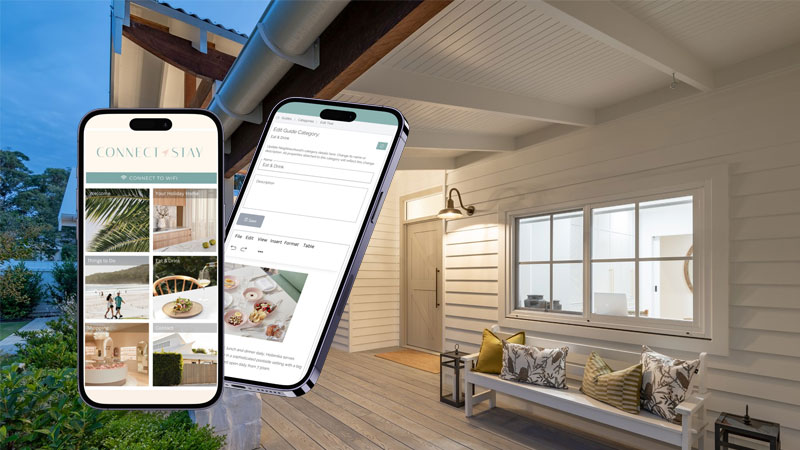
This is why platforms like Connect & Stay Digital Compendium are becoming essential tools for modern hosts.
How Connect & Stay Solves This
Connect & Stay Digital Compendium simplifies the entire process.
Instead of building documents manually, you get:
- Pre-built structure based on best practices
- Easy editing and updates
- Mobile-optimised guest access
- A polished, premium guest experience
It turns your compendium from a static document into a smart guest communication tool.
If your current compendium is outdated, incomplete, or costing you time, it’s time to upgrade.
Connect & Stay Digital Compendium gives you everything you need to create a professional, guest-ready guide in minutes.
No formatting. No printing. No repeated guest questions.
Start building your digital compendium today or request a demo to see it in action.
Common FAQ’s
It provides guests with all the information they need for their stay, reducing confusion and improving overall experience.
Digital is preferred due to ease of updates, accessibility, and improved user experience.
It should be concise but complete, covering essential information without overwhelming the guest.
Check-in instructions and property access details are the most critical.
Yes, digital compendiums allow real-time updates without needing to reprint anything.